The Semrush AI Visibility Toolkit shows you how brands appear in AI-generated answers, helping you measure a new layer of visibility beyond traditional search. This toolkit is designed for SEOs and marketers who want to monitor how their site and competitors are positioned across AI systems.
How Can the AI Visibility Toolkit Help Me?
The AI Visibility Toolkit helps you understand and adapt your strategy for the new landscape of AI-driven search. Use it to:
- Benchmark your brand's AI visibility and mentions.
- Analyze your brand perception and sentiment compared to competitors.
- Discover relevant prompts and topics to target for new visibility.
- Track your daily AI visibility for prompts that matter most to your business.
- Audit your site for technical issues that could block AI crawlers.
- Identify competitive gaps and opportunities in the AI search landscape.
- Turn complex AI data into presentation-ready reports.
Who Should Use the AI Visibility Toolkit?
The AI Visibility Toolkit is built with SMBs, agencies, and mid-market companies in mind. It’s designed for teams and professionals who need practical, scalable insights to strengthen their presence in AI-driven search. It’s especially valuable for:
- Marketing and SEO teams looking to benchmark clients against competitors, spot visibility gaps, and refine content strategies for AI visibility
- SEOs and full-stack marketers who need to monitor AI search trends, resolve visibility blockers, and adapt strategies for sustained performance in AI-generated results
- Business and product managers who want to keep a pulse on brand perception and uncover new opportunities in the evolving AI search landscape
What Does the AI Visibility Toolkit Include?
The toolkit gives you access to specialized reports and metrics for analysis, brand management, and monitoring.
- Visibility Overview: Get a benchmark of any brand's overall presence in AI search with the AI Visibility Score. You can analyze this data on a Worldwide scale or drill down into specific available regions. See where your brand appears in AI-generated answers, spot competitor activity, and identify opportunities for growth.
- Competitor Research: See how AI platforms position your competitors compared to your brand. Use this report to uncover visibility gaps and identify the prompts and topics where others are getting cited but you aren't.
- Prompt Research: Discover and prioritize AI search topics to target. Think of it as keyword research for AI—you can see topic-level volume, difficulty, and user intent to find new opportunities.
- Brand Performance: Understand how AI platforms perceive your brand against competitors. This suite of reports analyzes your Share of Voice, brand sentiment, and the key narratives driving your reputation to provide AI-generated strategic recommendations.
- Prompt Tracking: Monitor your visibility for specific, high-value prompts on platforms like Google AI Mode and ChatGPT. You can track your presence day-by-day to measure the results of your optimizations and act quickly on any sudden drops.
- AI Search Site Audit: Check your website for technical issues that might prevent AI bots from crawling your content. The Al Search Health widget in Site Audit flags potential blockers so you can ensure your site is fully accessible.
Pricing
- Price: $99 per month.
- Trial: No, the AI Visibility Toolkit does not offer a free trial.
- Includes:
- 1 folder
- 1 domain for Brand Performance analysis
- 300 daily queries in AI Analysis reports and 1000 daily queries in Prompt Research
- 25 prompts for Prompt Tracking
- AI Search Checks in Site Audit for up to 100 pages
- 10 CSV exports daily
Access & Sharing in Corporate Accounts
In a corporate account with multiple users, access to the AI Visibility Toolkit can be shared across your team by adding another license ($99) for each subuser on the account.
This gives your teammate access to AI Analysis reports, Prompt Tracking, and their own separate set of Brand Performance reports.
Additional domains or locations for Brand Performance can be purchased for $99 each.
Note: Adding an additional domain increases the number of domains you can analyze in Brand Performance—it does not grant another user access.
How to Get More Limits for the AI Visibility Toolkit
There are two ways to increase the limits of your AI Visibility Toolkit.
With Semrush One
Semrush One bundles the SEO and AI Visibility toolkits into three subscription plans (Starter, Pro+, and Advanced), which automatically increase your prompt tracking limits.
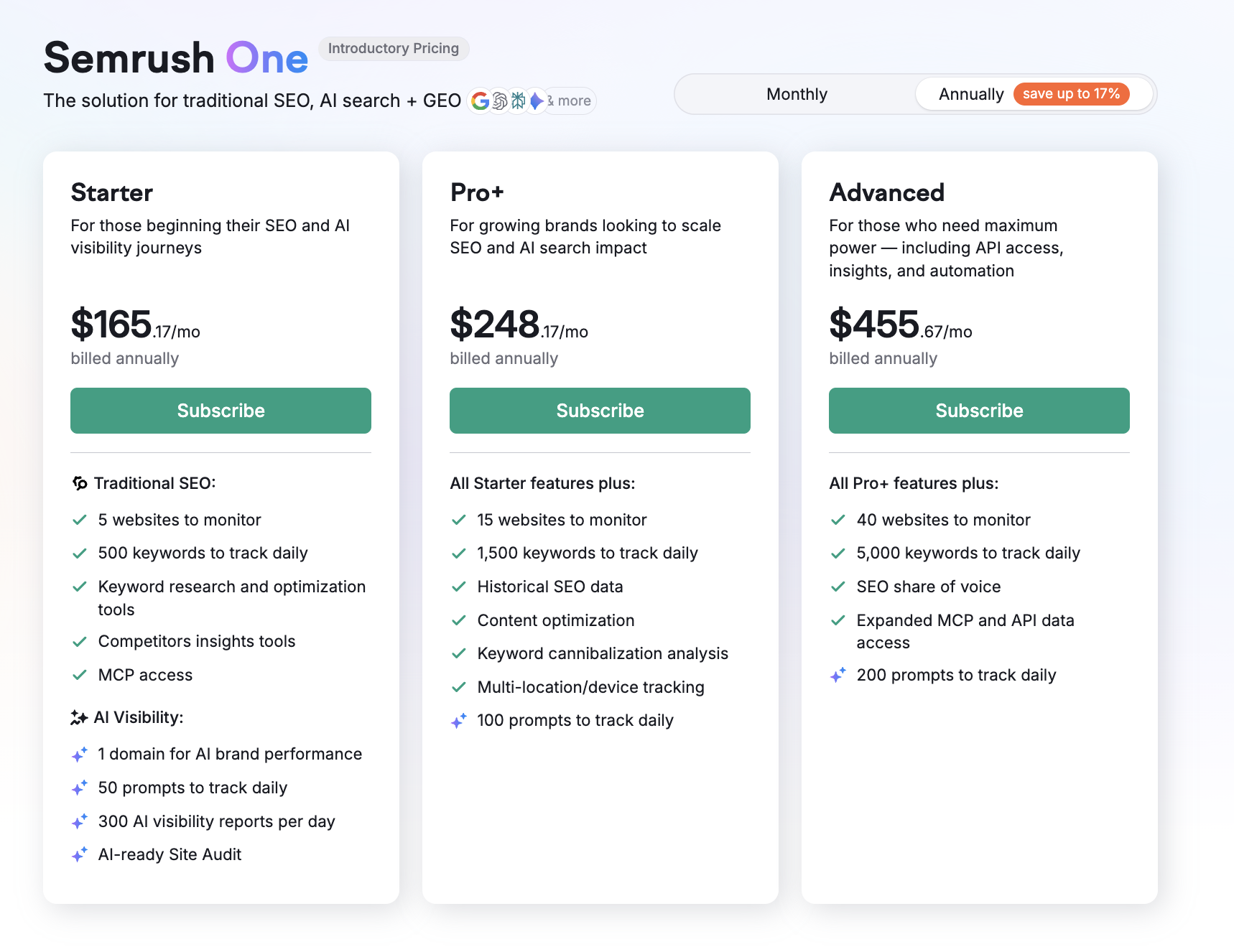
- Starter: Monitor up to 5 websites in the SEO monitoring tools (e.g., Position Tracking or Site Audit), 50 prompts, and 500 keywords (daily tracking).
- Pro+: Monitor up to 15 websites in the SEO monitoring tools, 100 prompts, and 1,500 keywords (daily tracking).
- Advanced: Monitor up to 40 websites in the SEO monitoring tools, 200 prompts, and 5,000 keywords (daily tracking).
By Purchasing Add-Ons
You can also purchase additional limits for specific features as needed:
- Additional Domain for Brand Performance: You can purchase the ability to track additional domains for $99 per domain per month.
- Additional Prompts: You can add 50 more prompts to your Prompt Tracking limit for $60 per month.
Frequently Asked Questions
Is there a free trial for the AI Visibility Toolkit?
No, the AI Visibility Toolkit does not currently offer a free trial. A paid subscription is required to access the toolkit.
Which regions does the AI Visibility Toolkit cover?
- Visibility Overview, Competitor Research, and Prompt Research cover:
- Australia
- Brazil
- Canada
- France
- Germany
- India
- Italy
- Japan
- Mexico
- Netherlands
- Spain
- Sweden
- United Arab Emirates
- United Kingdom
- United States
Visibility Overview supports a worldwide scale, in addition to region-specific filtering.
- Brand Performance reports: These reports are tied to the specific location and language you select during setup. As of now, there are more than 68,000 options worldwide—ranging from countries, states, regions, and cities, to global coverage. The report is centered around one domain, and you can add additional domains or locations for $99 each.
- Prompt Tracking: Offers broad international coverage, supporting 220+ countries and territories across all major global markets.
How often is the data updated?
- Visibility Overview, Competitor Research, Prompt Research: updated daily on a rolling basis.
- Brand Performance reports: updated weekly.
- Prompt tracking: updated daily.
- AI Search Site Audit: updated on demand (as often as you run the audit).
How is the AI Visibility Score calculated?
The AI Visibility Score reflects how often your brand is mentioned in AI-generated answers compared to the median number of mentions for your top industry competitors. We automatically identify these competitors to benchmark your visibility within your space.
How do the Brand Performance reports work?
The Brand Performance reports gather a vast collection of common queries and run them through LLMs like ChatGPT and Google's AI Mode. The toolkit then analyzes the AI responses to see how your brand is mentioned, assesses the tone and attributes used, and generates actionable recommendations to refine your brand's positioning.
What are the limits for exporting to CSV?
CSV export in AI Visibility Toolkit reports is available only to users with an active AI Visibility Toolkit or Semrush One subscription. You can export up to 1,000 rows per export, and each user can run up to 10 exports per day.
Is the AI Visibility Toolkit included for all users in a corporate account?
No, the AI Visibility Toolkit is not automatically included for every user in a corporate account. Each user must have their own AI Visibility Toolkit subscription and an assigned access limit in User Management. The toolkit cannot be shared via shared limits, so access must be purchased and assigned separately for each team member.
Can I share AI Visibility Toolkit campaigns or data with others?
You cannot share campaigns directly with other users, either within your team or outside your account. However, you can share insights by exporting data (e.g., CSV or PDF files) or creating reports using the My Reports tool. This allows you to distribute results without giving direct access to the toolkit.